
Privy Integration
Privy and embedded wallet swap API for integrated Solana swap execution. Supports ALT compression, fresh blockhash signing, and efficient transactions.
Seamlessly integrate Vybe swaps with Privy embedded wallets. Privy requires special handling for transaction blockhashes. Vybe's privy mode handles this automatically while preserving transaction efficiency.
The Challenge
Privy embedded wallets have a unique requirement: they need to inject a fresh blockhash at signing time. This creates a problem:
- Vybe builds a transaction with a real blockhash (for validation)
- Privy needs to replace that blockhash with a fresh one
- Naive approach: Deserialize → modify → reserialize
- Problem: This destroys Address Lookup Table compression, doubling transaction size
Without Privy Mode:
Original transaction: 850 bytes (compressed with ALT)
After Privy rebuild: 1,800 bytes (ALT compression lost) ❌

With Privy Mode:
Original transaction: 850 bytes (compressed with ALT)
After blockhash patch: 850 bytes (compression preserved) ✅
Demo for Solana Swap API & Router
The free live demo for these endpoints can be found here:
- Live demo: https://solana-swap-api.vybenetwork.com
- GitHub repo: https://github.com/vybenetwork/solana-swap-api
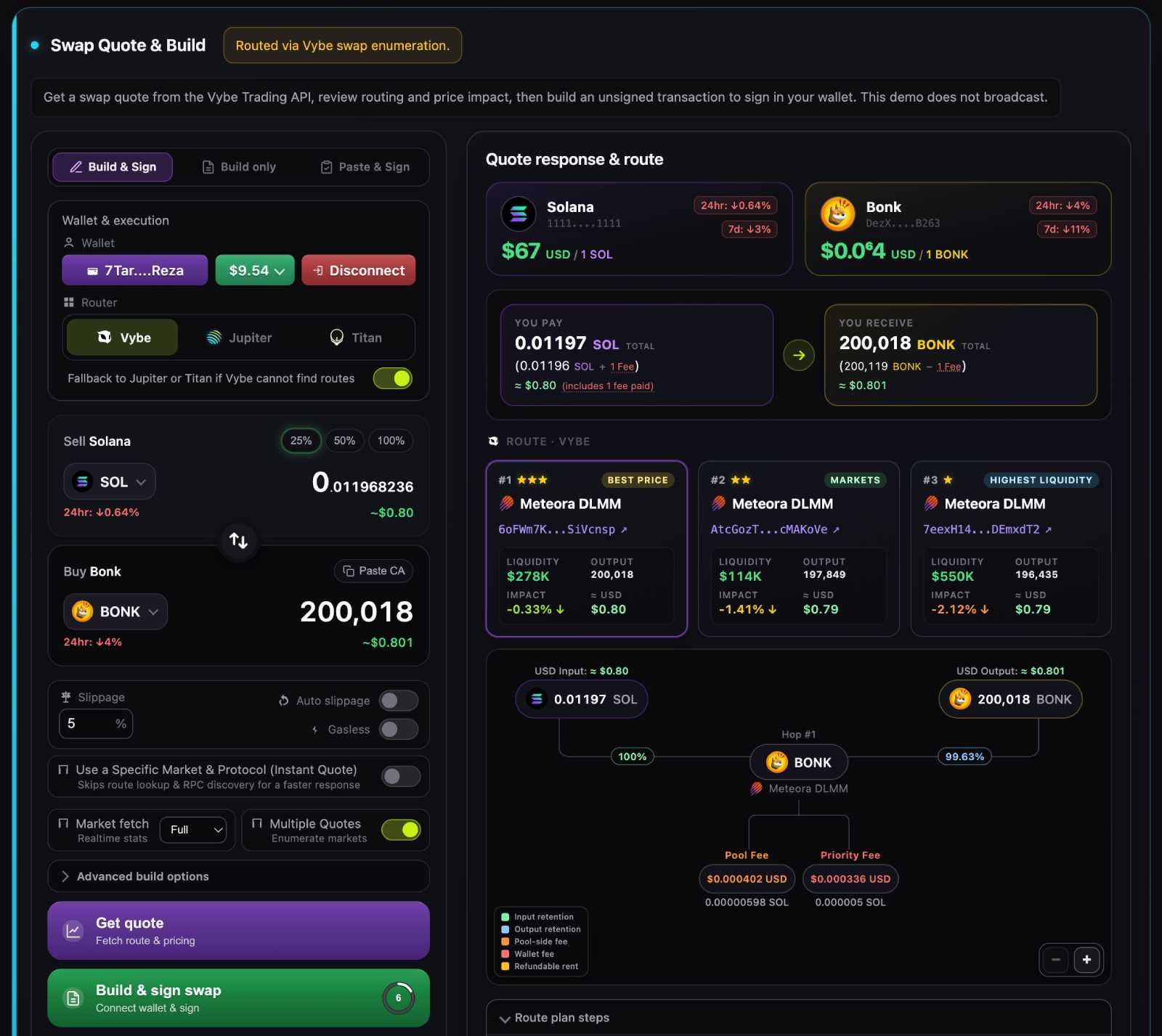
You can visit this link to access and try the demo: https://solana-swap-api.vybenetwork.com
How Privy Mode Works
When privy: true, Vybe uses a clever approach:
- Build normally with real blockhash (for validation/simulation)
- Test the transaction to ensure it works
- Patch blockhash bytes directly to placeholder (
11111...1111) - Return patched transaction to Privy
- Privy replaces placeholder with fresh blockhash during signing
┌─────────────────────────────────────────────────────────────┐
│ Vybe API                                                    │
│                                                             │
│   1. Build transaction with real blockhash                  │
│   2. Simulate/validate transaction ✅                       │
│   3. Patch blockhash bytes → "1111111...111111"             │
│   4. Return patched transaction                             │
│                                                             │
└─────────────────────────────────────────────────────────────┘
                              │
                              ▼
┌─────────────────────────────────────────────────────────────┐
│ Privy Signing                                               │
│                                                             │
│   1. Detect placeholder blockhash                           │
│   2. Replace with fresh blockhash                           │
│   3. Sign transaction                                       │
│   4. Submit to network                                      │
│                                                             │
└─────────────────────────────────────────────────────────────┘
Enable Privy Mode
Add privy: true to your swap request:
curl -X POST "https://api.vybenetwork.com/trading/swap" \
  -H "X-API-Key: YOUR_API_KEY" \
  -H "Content-Type: application/json" \
  -d '{
    "wallet": "UserWalletAddress",
    "amount": 0.1,
    "inputMint": "So11111111111111111111111111111111111111112",
    "outputMint": "EPjFWdd5AufqSSqeM2qN1xzybapC8G4wEGGkZwyTDt1v",
    "router": "vybe",
    "slippage": 2,
    "privy": true
  }'
What's Preserved
Privy mode maintains everything important about the transaction:
| Aspect | Preserved? |
|---|---|
| ✅ Transaction size | Same bytes |
| ✅ Address Lookup Table compression | Fully preserved |
| ✅ All instruction encoding | Unchanged |
| ✅ Account ordering | Unchanged |
| ✅ Signatures placeholder | Ready for signing |
The only change is 32 bytes of blockhash replaced with 1111...1111.
Integration Example
Using Privy React SDK
import { usePrivy, useSolanaWallets } from '@privy-io/react-auth';

function SwapWithPrivy({ inputMint, outputMint, amount }) {
  const { ready, authenticated } = usePrivy();
  const { wallets } = useSolanaWallets();
  const [loading, setLoading] = useState(false);

  async function executeSwap() {
    if (!ready || !authenticated || wallets.length === 0) return;

    const wallet = wallets[0];
    setLoading(true);

    try {
      // Step 1: Build transaction with privy mode
      const response = await fetch('https://api.vybenetwork.com/trading/swap', {
        method: 'POST',
        headers: {
          'X-API-Key': API_KEY,
          'Content-Type': 'application/json'
        },
        body: JSON.stringify({
          wallet: wallet.address,
          amount,
          inputMint,
          outputMint,
          router: 'vybe',
          slippage: 2,
          privy: true  // Enable Privy mode
        })
      });

      const { transaction: txBase64 } = await response.json();

      // Step 2: Privy signs and handles blockhash replacement
      const signedTx = await wallet.signTransaction(
        Buffer.from(txBase64, 'base64')
      );

      // Step 3: Submit to network
      const connection = new Connection('https://api.mainnet-beta.solana.com');
      const signature = await connection.sendRawTransaction(signedTx);

      await connection.confirmTransaction(signature, 'confirmed');
      console.log('Swap successful:', signature);

    } catch (error) {
      console.error('Swap failed:', error);
    }

    setLoading(false);
  }

  return (
    <button onClick={executeSwap} disabled={loading || !authenticated}>
      {loading ? 'Swapping...' : 'Swap with Privy'}
    </button>
  );
}
Server-Side Integration
// For server-side Privy integration
async function buildPrivySwap(userWallet, inputMint, outputMint, amount) {
  const response = await fetch('https://api.vybenetwork.com/trading/swap', {
    method: 'POST',
    headers: {
      'X-API-Key': process.env.VYBE_API_KEY,
      'Content-Type': 'application/json'
    },
    body: JSON.stringify({
      wallet: userWallet,
      amount,
      inputMint,
      outputMint,
      router: 'vybe',
      slippage: 2,
      privy: true
    })
  });

  const result = await response.json();

  // Return base64 transaction ready for Privy signing
  return {
    transaction: result.transaction,
    quote: result.quote,
    // Privy will handle blockhash replacement during signing
  };
}
Supported Endpoints
Privy mode works with all Vybe transaction endpoints:
| Endpoint | privy Support |
|---|---|
/trading/swap | ✅ |
/batchSwap | ✅ |
/api/burn-tokens | ✅ |
/api/close-token-accounts | ✅ |
/withdrawMev | ✅ |
/claimAll | ✅ |
Combining with Other Features
Privy mode works alongside other Vybe features:
{
  "wallet": "...",
  "amount": 1,
  "inputMint": "...",
  "outputMint": "...",
  "router": "vybe",
  "slippage": 2,
  "fee": 1,
  "gasless": true,
  "privy": true
}
This creates a gasless swap with fee extraction, optimized for Privy signing.
Why Not Just Use Placeholder from Start?
You might wonder: "Why build with real blockhash then patch?"
The answer is validation:
- Real blockhash allows proper transaction simulation
- We can catch errors before returning to user
- Transaction size and structure are validated
- Only after validation do we patch for Privy
If we started with a placeholder, we couldn't properly simulate or validate the transaction.
Technical Details
Blockhash Patch Location
The blockhash is always at a fixed offset in the transaction:
- Versioned transactions: bytes 1-33 (after version byte)
- The patch replaces exactly 32 bytes
Placeholder Value
11111111111111111111111111111111This is the base58 representation of 32 zero bytes—easy for Privy to detect and replace.
Troubleshooting
Transaction Too Large After Privy Signing
If your transaction size increases after Privy signing, ensure:
- You're passing
privy: truein the request - You're not deserializing/reserializing the transaction before passing to Privy
Blockhash Expired
Privy should replace the placeholder with a fresh blockhash. If you see "blockhash expired":
- Ensure Privy is properly detecting and replacing the placeholder
- Check Privy SDK version is up to date
Simulation Failures
The transaction is simulated with a real blockhash before patching. If simulation fails:
- Check the error message in the API response
- The issue is with the swap itself, not Privy integration
Next Steps
- Build Transaction - Full parameter reference
- Gasless Mode - Combine with gasless for best UX
- Supported Protocols - Available DEX integrations
Updated 2 months ago